01
Agree the layout
We confirm the door layout from your drawing or propose one.
WETS AI builds HMI and operator panels in Houston, from a single door-mounted touchscreen to full operator stations with pushbuttons, selector switches, pilot lights and emergency stops. We cut the door to your layout, wire every device, and test the HMI with the final screens before the panel ships.
The operator panel is the part of the system people touch every day. It should show the right information, put the most used controls within easy reach, and make the emergency stop impossible to miss.

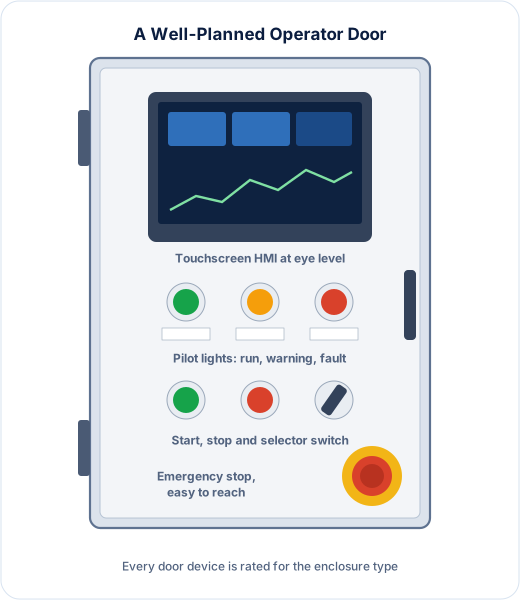
We group devices by function, keep the HMI at a comfortable viewing height, and place the emergency stop where it can be reached quickly. Every device is identified to match the drawings.
Every cutout weakens an enclosure, so we use devices rated for the enclosure type. A NEMA 4X panel with an HMI and pushbuttons should still be a NEMA 4X panel when it leaves our shop.
Screen size should follow the amount of information an operator needs at once. A small pump station may need one overview screen; a treatment train with trends and alarm history needs more room.
Location matters too. Outdoor panels need screens that stay readable in direct sun and devices rated for the weather. Where operators wear gloves, larger touch targets and physical pushbuttons for the most common actions make the panel easier and safer to use.
We match the HMI to your PLC platform, so screens, alarms and tags are configured with the same tools your team already uses.

We confirm the door layout from your drawing or propose one.
Cutouts are made and devices mounted to the layout.
Every device is wired and every wire marked to the drawings.
The HMI is loaded with the final screens and every device is tested.
Yes. Send the layout drawing and we will cut, mount and wire every device to it, or we can propose a layout for you.
Yes, as long as every door device is rated for the enclosure type. We select devices so the finished panel keeps its rating.
Yes. Our team builds HMI screens for Allen-Bradley, Siemens and Schneider Electric HMIs, or loads yours.
Yes. We build standalone operator stations that connect back to the main control panel.
Mostly NEMA 1 for clean indoor rooms, NEMA 3R for outdoor sites, NEMA 4 for hose-down areas and NEMA 4X where corrosion is a concern. Tell us where the panel will be installed and we will recommend a rating.
Programs written in-house for Allen-Bradley, Siemens and Schneider Electric, tested at FAT.
Controllers, I/O, networks and power, built to UL 508A and tested point by point.
The 13 checks every panel passes, plus witnessed FAT and SAT on site.
Send your door layout or describe what operators need to see and do. We will quote the panel, and the screens if you need them.